Everything you hear falls in.
Hear a track in a reel, a story or a mix. Share it to Singularity. It names the song, finds the best copy, tags it and puts it in your library. Then play it, mix it and record it in the same app.
Android only for now. Create a free account in the app, start on Free, and upgrade whenever you like. You download the APK from this site: it is not on Google Play or the App Store.


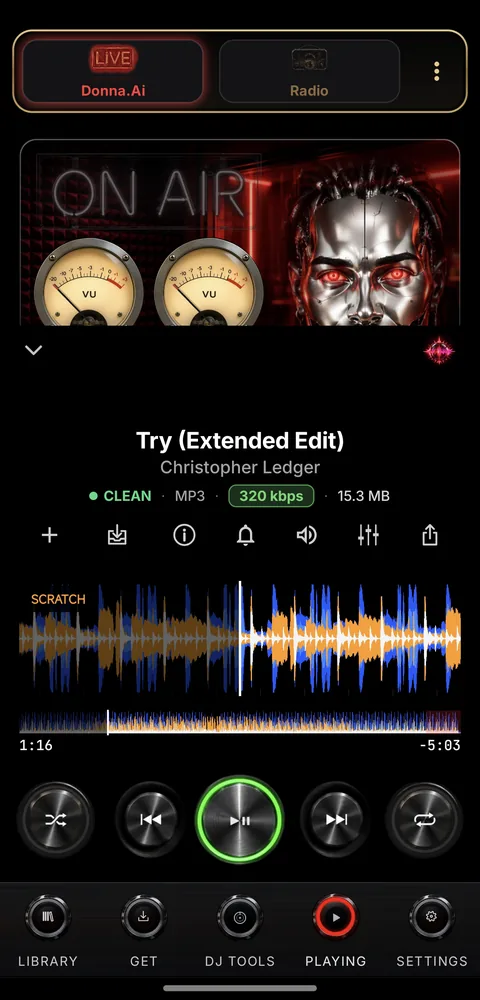
The player: a waveform, the file's quality and the transport keys.
Share a post, the song arrives.
Reels, posts, comments and links. Named, tagged, no duplicates.
Fill your playlists from the phone.
Add songs to your own playlists on your computer, right from your phone.
Record sets from your phone.
Record a set, split it into tracks and post the tracklist.
Take your playlists to the booth.
Export your playlists to a USB stick for CDJs.
Some features need Full or the DJ add-on: see Pricing.
One app for every step of a DJ's process.
The person behind Singularity has been DJing for over 15 years. He built it to help DJs at every step, from one dedicated app. Here are the nine steps, and where the app comes in.
Discovery
Get search, Follows and the Inbox show you what's out there and what's new.
Some steps need Full or the DJ add-on: see Pricing.
-
Discovery
Get search, Follows and the Inbox show you what's out there and what's new.
All plans![Get search with results from Soulseek, with FLAC badges and download buttons.]()
-
Downloading
The Get queue shows every download as it happens, source by source.
![The Get queue dashboard with a download counter and a lamp for each source.]()
-
Listening
Library and Now Playing: a gapless player with a waveform.
![Now Playing: Try (Extended Edit) by Christopher Ledger, 320 kbps.]()
-
Sorting
Playlists keep your downloads in order, with an Unsorted list for tracks you haven't filed yet. Finish tidies a recorded set.
![The Library with its playlists and a mini-player.]()
-
Practising
DJ Decks: two decks with scratch and EQ, to work on a set at home.
DJ add-on![Two DJ decks with waveforms and jog wheels.]()
-
Exporting
Export your playlists to a USB stick for CDJs.
DJ add-on![The DJ Tools screen with the Export to USB key.]()
-
Playing
Play from decks and the mixer, or from a USB stick. There's a head-unit layout for the car.
DJ add-on![The DJ mixer with channel EQ, filters and crossfader.]()
-
Recording
Mix Recorder and DJM Recorder capture the set. Finish turns it into tracks.
DJ add-on![The Mix Recorder with level meter and a Start recording key.]()
-
Enjoy
VizBlaster turns the music into live visuals. Swipe through the presets, tune how it reacts and keep your favourites.
Full![VizBlaster showing live visuals, with Tune and Favourites keys.]()